

Email Security Tools
Protect your domain from email spoofing
DMARC, DKIM, and SPF stop criminals from sending fake email that looks like it came from your business. Use the free tools on this page to check and fix your email security records.
Understanding DMARC, DKIM, and SPF
Use this page to check and tune your email security records so criminals have a harder time pretending to be you.
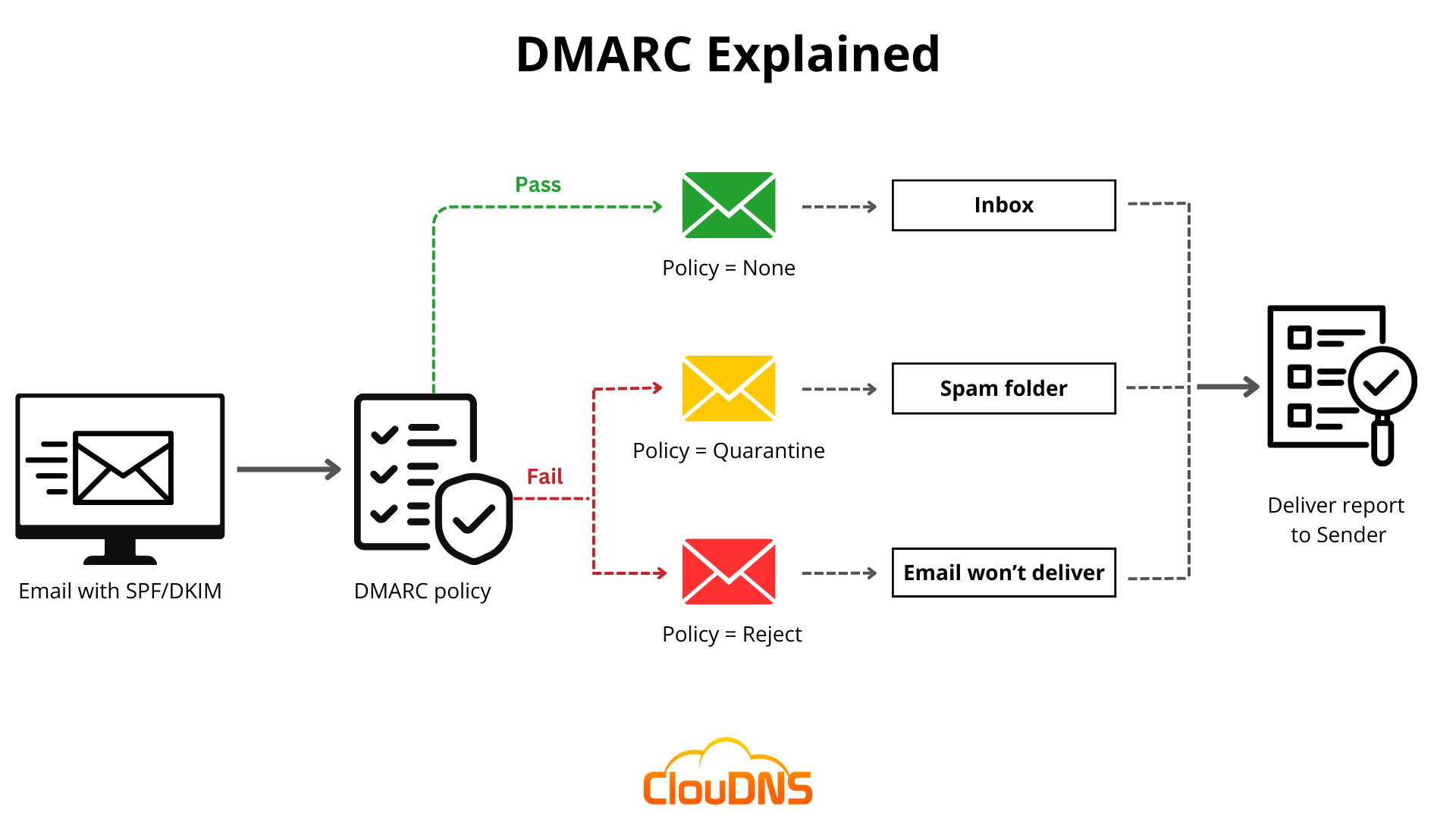
What DMARC, DKIM, and SPF do for your business
Every day, criminals send fake emails that appear to come from real businesses. They use your domain name to trick your customers into clicking malicious links, wiring money, or handing over login credentials. DMARC, DKIM, and SPF are the three email authentication standards that make this much harder to pull off.
Think of SPF and DKIM as ID checks for your outgoing email. SPF tells the internet which mail servers are allowed to send on behalf of your domain. DKIM attaches a digital signature to each message so the receiving server can confirm the email was not tampered with in transit. DMARC is the policy on top — it tells receiving servers what to do when a message fails those checks, whether that means sending it to spam or blocking it outright.
Without these records properly configured, your emails are more likely to land in spam folders and it becomes easier for attackers to impersonate your business.
Why SPF and DKIM matter
SPF lists which mail servers are allowed to send mail for your domain. DKIM signs each message with a cryptographic key so the receiver can verify it was not changed in transit.
If either one is missing or misconfigured, your messages are more likely to land in spam or get rejected entirely.
What DMARC adds
DMARC tells receiving mail servers how strictly to enforce SPF and DKIM when the From address does not line up with what those checks expect.
- none — monitor only, take no action
- quarantine — send failures to spam
- reject — block failures outright
What to do if your records are failing
If a report or vendor portal shows failing SPF, DKIM, or DMARC records, it usually means one of three things:
- A new system sending email on your behalf — such as a newsletter tool or invoicing app — was never added to your SPF or DKIM records.
- Your domain moved mail providers but old records were left behind and are now conflicting.
- Someone is actively trying to spoof your domain and DMARC is flagging the traffic.
Use the tools in the sidebar to see what is published for your domain right now. If you want someone to map it all out and keep it aligned with your broader security setup, Wolferdawg IT Consulting can roll that into an ongoing support relationship through our cybersecurity services or managed IT services.
How this fits with the rest of your email security
If your business uses Microsoft 365 Business Premium, your SPF, DKIM, and DMARC records need to be aligned with how Microsoft routes your mail. Getting this right is one of the first things Wolferdawg IT Consulting addresses when onboarding a new client, because misconfigured records cause deliverability problems that are easy to fix but disruptive to live with.
Wolferdawg IT Consulting can review your DMARC results, fix broken records, and help you move toward a reject policy without disrupting legitimate email.
Free email security tools
Use these tools to check and generate your email authentication records.